
🍿 3 min. read
Refactoring useState() To useReducer()

I recently created a Stimulus Check Calculator based on figures from the CARES Act and the Washington Post to help people estimate the amount of their stimulus check under the CARES Act.
This article will walk through how I refactored the calculator's state management by consolidating multiple useState() React hooks into a single useReducer(). useReducer() is an alternative that can be considered when using useState() to manage state in functional React components. This article assumes some familiarity with state management in React and React Hooks.
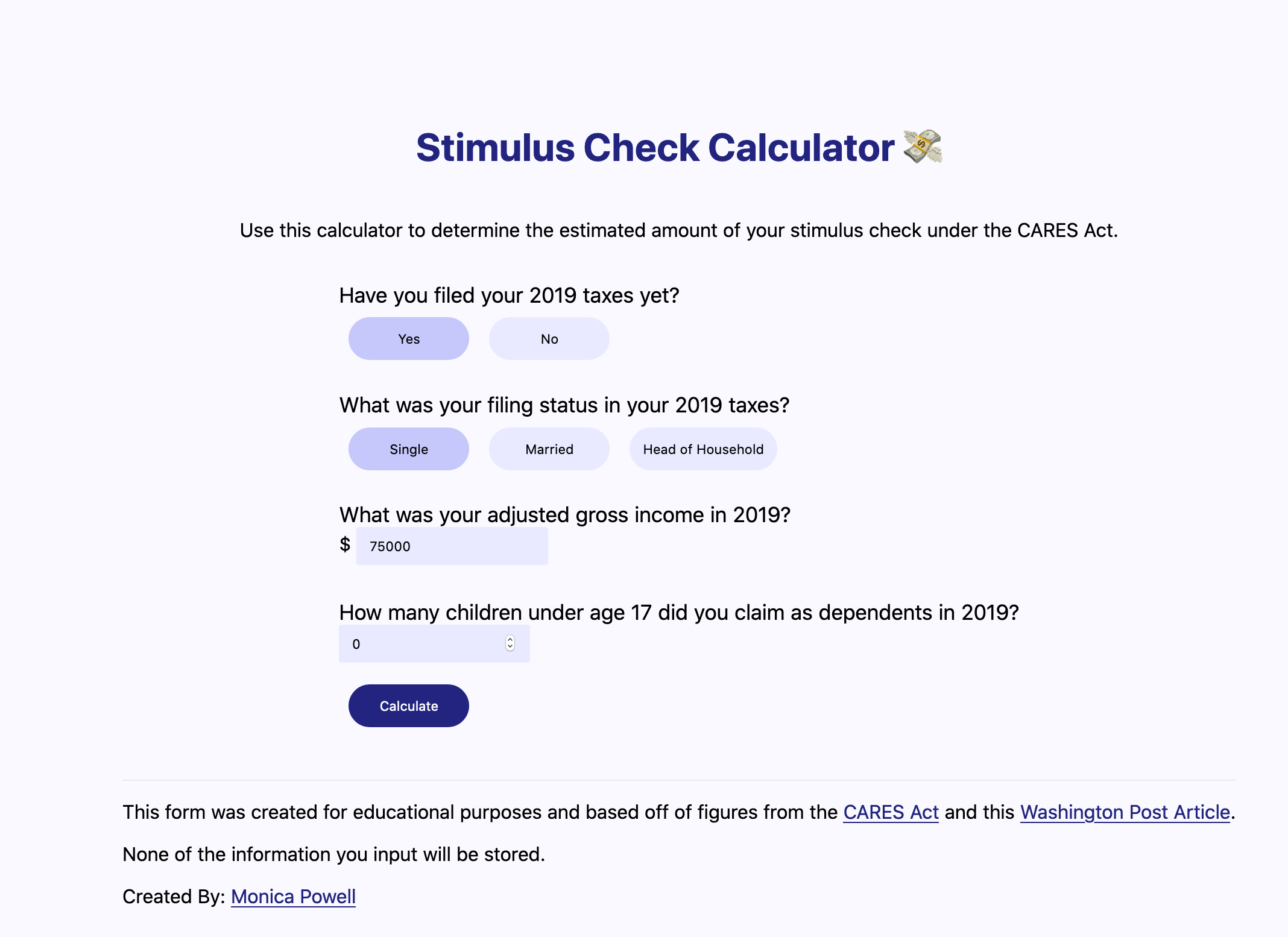
Table of Contents
Managing form state with useState();
In order to use the useState() React hook for state management of the calculator I first needed to import useState from React.
1import { useState } from "react"Setting the initial state with useState()
Then within the function that is returning the Form component I setup the useState() hooks for taxYear, filingStatus,income, children and stimulusAmount.
1const { SINGLE, HEADOFHOUSE, MARRIED } = filingStatuses2const [taxYear, setTaxYear] = useState(2019)3const [filingStatus, setFilingStatus] = useState(SINGLE)4const [income, setIncome] = useState("75000")5const [children, setChildren] = useState(0)6const [stimulusAmount, setStimulusAmount] = useState(-1)The parameter passed into useState() represents the default value for that particular state. Meaning that the below line is setting the default value of taxYear in state to 2019.
1const [taxYear, setTaxYear] = useState(2019)Updating form state with useState()
Event handlers, such as onChange or onClick can be used to update the component's state when data in the form changes. Managing form state by updating the component's internal state is considered a "controlled component" vs. having the DOM manage the state of the form.
In order to update the taxYear's value to the selected year, there's an onClick event handler that calls setTaxYear(year) with the year parameter being the current year that is selected.
1{2 ;[2019, 2018].map(year => (3 <button4 onClick={() => setTaxYear(year)}5 className={year == taxYear ? "selectedButton" : ""}6 key={year}7 name="tax-year"8 >9 {year == 2019 ? "Yes" : "No"}10 </button>11 ))12}Similar logic is used to update filingStatus income and children, stimulusAmount and handleSubmit when form data is updated or submitted.
Managing form state with useReducer();
In order to use the useReducer() React hook for state management of the calculator I first needed to import useReducer from React. If you are not familiar with reducers in JavaScript check out my article on Understanding Reduce in Javascript
1import { useReducer } from "react"Setting the initial state with useReducer()
Then I set the initial state for the component like:
1const initialState = {2  taxYear: 2019,3  filingStatus: SINGLE,4  income: "75000",5  children: 0,6  stimulusAmount: -1,7}8
9const [state, dispatch] = useReducer(reducer, initialState)
Similar to useState, useReducer returns the related state along with a method to update the state. With useReducer instead of updating the state by passing a value to setState() an action should be dispatched which will call the reducer.
In my case the reducer function looked like:
1function reducer(state, action) {2 const { type, payload } = action3 return { ...state, [type]: payload }4}Updating form state with useReducer()
Each time dispatch is called it should be called with an action item that contains a type and in this particular case a payload as well. The state of tax year can be updated onClick by firing
1onClick={() => dispatch({ type: "taxYear", payload: year })}instead of
1onClick={() => setTaxYear(year)}reducer(state, action) is expecting to receive an action that is an object with type and payload. Within the reducer function the action's type and payload are used to return the current state with the [type]: payload overwritten.
1const { type, payload } = action2return { ...state, [type]: payload }In the case of updating the state from 2017 if the current state was:
1const initialState = {2 taxYear: 2019,3 filingStatus: SINGLE,4 income: "75000",5 children: 0,6 stimulusAmount: -1,7}Then firing onClick={() => dispatch({ type: "taxYear", payload: 2018 })} would result in the reducer returning the current state but with only the value of taxYear overwritten and set to 2018. Note: this works as written because for each action in this example the type of action is the same as its corresponding key value in state.
Full Source Code of Examples
The full source code below compares the full implementations of the state management methods above. As was illustrated above, useReducer() is another React hook that can be used for state management and can be implemented in a way that allows logic from useState() hooks to be consolidated. The related source code for the current version of the calculator is available on GitHub.
source code using useState():
1import { filingStatuses } from "../utils/constants"2import { getStimulusAmount } from "../utils/calculateStimulus"3import { useState } from "react"4
5function Form() {6  const { SINGLE, HEADOFHOUSE, MARRIED } = filingStatuses7  const [taxYear, setTaxYear] = useState(2019)8  const [filingStatus, setFilingStatus] = useState(SINGLE)9  const [income, setIncome] = useState("75000")10  const [children, setChildren] = useState(0)11  const [stimulusAmount, setStimulusAmount] = useState(-1)12
13  function handleSubmit(e) {14    e.preventDefault()15    setStimulusAmount(calculateStimulus(income, filingStatus, children))16  }17
18  return (19    <form onSubmit={handleSubmit}>20      <label htmlFor="tax-year">Have you filed your 2019 taxes yet?</label>21      {[2019, 2018].map(year => (22        <button23          onClick={() => setTaxYear(year)}24          className={year == taxYear ? "selectedButton" : ""}25          key={year}26          name="tax-year"27        >28          {year == 2019 ? "Yes" : "No"}29        </button>30      ))}31      <label htmlFor="filing-status">32        What was your filing status in your {taxYear} taxes?{" "}33      </label>34      {[SINGLE, MARRIED, HEADOFHOUSE].map(status => (35        <button36          onClick={() => setFilingStatus(status)}37          className={status == filingStatus ? "selectedButton" : ""}38          name="filing-status"39          key={status}40        >41          {" "}42          {status}43        </button>44      ))}45      <br />46      <label htmlFor="adjusted-income">47        What was your adjusted gross income in {taxYear}?48      </label>$ <input49        type="number"50        inputMode="numeric"51        pattern="[0-9]*"52        value={income}53        onChange={e => setIncome(e.target.value)}54        min={0}55        name="adjusted-income"56      />57      <br />58      <label htmlFor="children">59        How many children under age 17 did you claim as dependents in {taxYear}?60      </label>61      <input62        type="number"63        inputMode="numeric"64        pattern="[0-9]*"65        value={children}66        onChange={e => setChildren(e.target.value)}67        min={0}68        name="label"69      />70      <br />71      <button type="submit" className="calculateButton">72        Calculate73      </button>74      <p>75        {" "}76        {stimulusAmount >= 0 &&77          (stimulusAmount > 078            ? `Your stimulus amount is expected to be $${stimulusAmount}.`79            : `You are not expected to receive a stimulus.`)}80      </p>81      <br />82    </form>83  )84}85
86export default Form
source code using useReducer():
1import { useReducer } from "react"2import { filingStatuses } from "../utils/constants"3import { getStimulusAmount } from "../utils/calculateStimulus"4
5function reducer(state, action) {6  const { type, payload } = action7  return { ...state, [type]: payload }8}9
10function Form() {11  const { SINGLE, HEADOFHOUSE, MARRIED } = filingStatuses12
13  const initialState = {14    taxYear: 2019,15    filingStatus: SINGLE,16    income: "75000",17    children: 0,18    stimulusAmount: -1,19  }20
21  const [state, dispatch] = useReducer(reducer, initialState)22
23  function handleSubmit(e) {24    e.preventDefault()25    dispatch({26      type: "stimulusAmount",27      payload: getStimulusAmount(income, filingStatus, children),28    })29  }30
31  const { taxYear, filingStatus, income, children, stimulusAmount } = state32
33  return (34    <form onSubmit={handleSubmit}>35      <label htmlFor="tax-year">Have you filed your 2019 taxes yet?</label>36      {[2019, 2018].map(year => (37        <button38          onClick={() => dispatch({ type: "taxYear", payload: year })}39          className={year == taxYear ? "selectedButton" : ""}40          key={year}41          name="tax-year"42        >43          {year == 2019 ? "Yes" : "No"}44        </button>45      ))}46      <label htmlFor="filing-status">47        What was your filing status in your {taxYear} taxes?{" "}48      </label>49      {[SINGLE, MARRIED, HEADOFHOUSE].map(status => (50        <button51          onClick={() => dispatch({ type: "filingStatus", payload: status })}52          className={status == filingStatus ? "selectedButton" : ""}53          name="filing-status"54          key={status}55        >56          {" "}57          {status}58        </button>59      ))}60      <br />61      <label htmlFor="adjusted-income">62        What was your adjusted gross income in {taxYear}?63      </label>$ <input64        type="string"65        inputMode="numeric"66        pattern="[0-9]*"67        value={income}68        onChange={e => dispatch({ type: "income", payload: e.target.value })}69        min={0}70      />71      <br />72      <label htmlFor="children">73        How many children under age 17 did you claim as dependents in {taxYear}?74      </label>75      <input76        type="number"77        inputMode="numeric"78        pattern="[0-9]*"79        value={children}80        onChange={e => dispatch({ type: "children", payload: e.target.value })}81        min={0}82        name="label"83      />84      <br />85      <button type="submit" className="calculateButton">86        Calculate87      </button>88      <p>89        {" "}90        {stimulusAmount >= 0 &&91          (stimulusAmount > 092            ? `Your stimulus amount is likely to be ${new Intl.NumberFormat(93                "en-US",94                { style: "currency", currency: "USD" }95              ).format(stimulusAmount)}.`96            : `You are not expected to receive a stimulus.`)}97      </p>98      <br />99    </form>100  )101}102
103export default Form
This article was published on April 04, 2020.
Webmentions
 2
2 5
5